


A Practical Checklist for Using AI-Generated Content in Law Firms
This is not a hypothetical.
In a recent court filing, a brief submitted by a law firm came under scrutiny after opposing counsel questioned the validity of several cited cases. On review, multiple citations could not be verified in any legal database.
The issue traced back to the research process. The associate had used ChatGPT to support the initial draft. The citations were generated in the correct format, with names and references that initially appeared credible. They were not independently verified before the brief was filed.
As a result, the matter shifted from legal argument to explanation before the court.
Incidents like this are no longer isolated. Courts are seeing them often enough to take note.
Did you know? Courts document 2–3 AI hallucination incidents daily.
This points to a simple gap. The work gets done, the output looks right, and it moves forward without a structured validation step. The effort is there. The process is not.
That gap becomes clearer when you look at the numbers:
- 700+ documented cases of AI-related citation issues tracked in U.S. courts through (2025 Damien Charlotin AI Hallucination Database)
- Up to $30,000 in sanctions imposed in cases involving inaccurate or unverified citations (U.S. court filings, 2026)
Why AI Gets Legal Work Wrong and Still Looks Right
AI does not fabricate things carelessly. It produces output with confidence because it is trained to sound authoritative, not to verify accuracy. It follows patterns of real legal writing and replicates them closely, including citation formats and structure, without confirming whether the underlying case exists.
That is what makes this risk specific to legal work.
A generated citation can look completely valid. It fits the jurisdiction, follows expected naming conventions, and reads like something pulled from a trusted database. It passes a quick review without raising concern. The only step it does not pass is the one that matters most, checking whether the case actually exists.
Real case, Colorado, 2024
Attorney Zachariah Crabill filed a custody motion containing fabricated citations generated using ChatGPT. When the judge questioned them, he denied using AI. An investigation later found that he had texted a paralegal, in his own words, “like an idiot,” he had never checked the output.
Outcome
90 day suspension, with the matter referred to the Colorado Supreme Court disciplinary authorities.
The good news is that none of this is inevitable. 85% of lawyers now use generative AI daily or weekly and when it is used within a clear process, it genuinely saves time and improves consistency. The difference between the firms using AI well and the ones getting sanctioned comes down to one thing: a system.
What that system looks like in practice is simple.
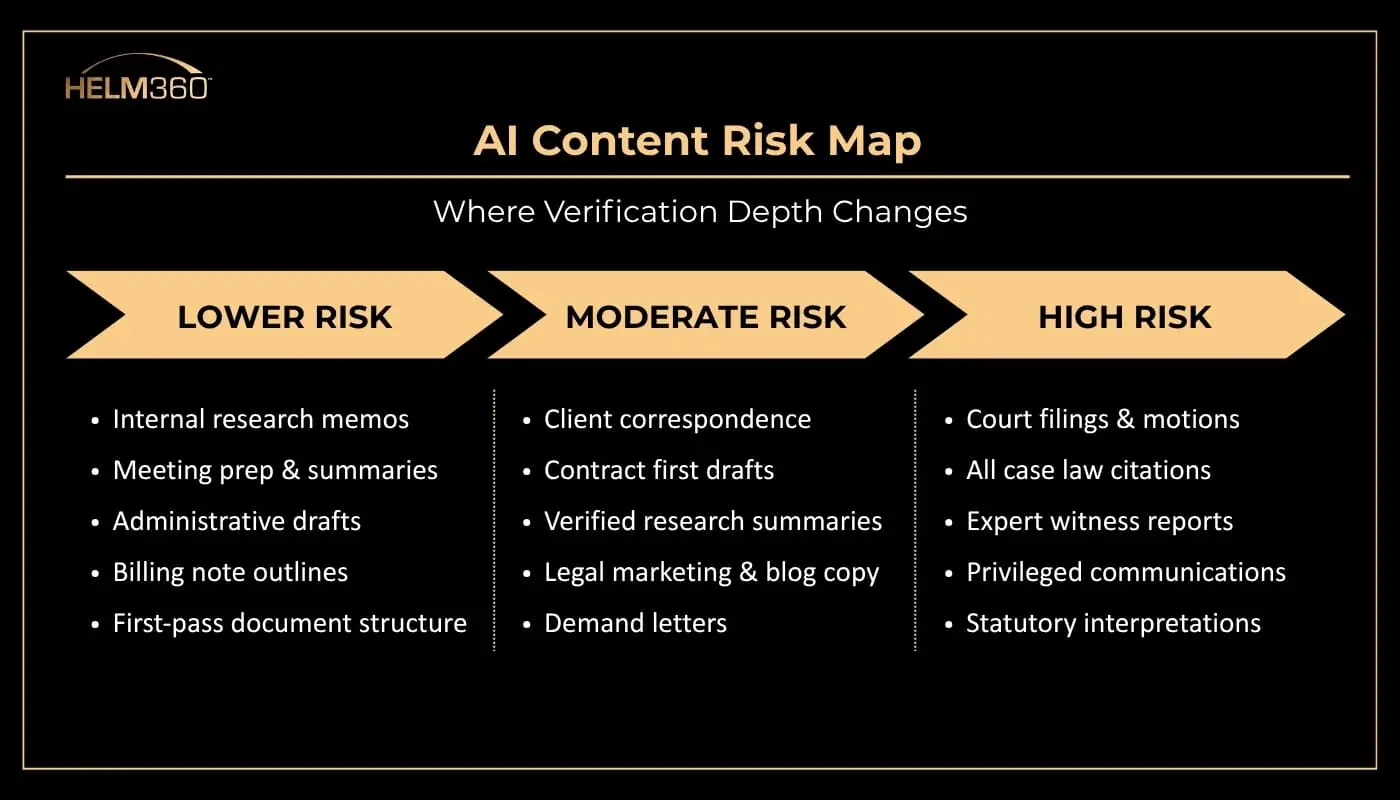
It starts with understanding where AI can be used with speed, and where it needs strict verification before anything moves forward.
Not all legal work carries the same level of risk.
The Checklist- 10 Things to Have in Place Before AI Goes Wrong
This is not a theory document or a policy memo. It is a working sequence, ordered by urgency.
Start with the non-negotiables, then move to core practices, and finally the steps that help firms operate ahead of the curve.
1. Classify the task before using any AI tool
Non-Negotiable
Internal memo? Client letter? Court filing? Answer this before a single prompt is typed. The classification determines your entire verification standard. It takes 20 seconds and changes everything downstream.
Why it matters
Most issues happen when the same workflow is used across different task types. That gap between task and process is where errors begin.
2. Do not enter confidential client data into public AI tools
Non-Negotiable
Free tools may use your input for training. Client-privileged data can leave your control. Use only enterprise tools with clear no-training commitments.
Why it matters
Attorney-client privilege does not hold once data enters a public system. This is not a mistake you can fix later.
3. Verify every citation against a primary source
Non-Negotiable
Every case, statute, and reference must be checked using trusted legal databases before it is used.
Why it matters
Once filed, the responsibility is yours. Courts hold attorneys accountable regardless of how the error occurred.
4. Require a second-attorney review for anything going to court
Core Practice
A second attorney who did not use the AI tool should review the document for factual accuracy and citation integrity.
Why it matters
The person who drafted the content often misses gaps. A fresh reviewer catches what was overlooked.
5. Stay updated on AI disclosure rules in your jurisdiction
Core Practice
AI disclosure requirements are evolving. Assign ownership to track changes or use a system that keeps this updated.
Why it matters
Courts expect transparency even where rules are not fully defined.
6. Log AI usage at the matter level
Core Practice
Track which tool was used, what was generated, how it was verified, and who approved it.
Why it matters
Clear documentation can reduce exposure if questions arise later.
7. Train the entire team
Core Practice
Training should cover approved tools, verification methods, escalation steps, and usage boundaries.
Why it matters
Risk often comes from unstructured or informal use, not from planned adoption.
8. Use a risk-based approach, not a blanket ban
Work Smart
Not all tasks need the same level of control. Match verification depth to the risk of the output.
Why it matters
Strict bans often push usage outside controlled systems.
9. Build governance into existing workflows
Work Smart
Embed AI checks into systems your team already uses, instead of relying on standalone documents.
Why it matters
If it is not part of the workflow, it will not be followed consistently.
10. Define your response to AI errors in advance
Work Smart
Have a clear plan for handling errors, including disclosure, correction, and internal review.
Why it matters
Prepared teams respond faster and limit impact when issues arise.
The Last Thing: Policy Only Works When It Lives in the Tools
A checklist pinned to the wall or emailed around doesn’t change behavior. Real governance happens where work actually gets done in the matter management system, intake forms, conflict checks, and billing workflows.
What does the well-governed firm look like in practice?
- Approved tools only
- No client data in public models
- Every citation verified before filing
- Documented second-review step for court work
- Matter-level AI log anyone can find
- Training that reached every attorney, including the quiet users
These firms are not slower.
They spend less time fixing avoidable issues, which means they move faster on the work that matters. Verification is not overhead. It is what protects momentum.
You can see how firms are thinking about this shift in conversations like AI Is Rewriting Law Firm Rules, where the focus is not on whether to use AI, but how to use it with control.
Want to Build This Into Your Firm’s Operations?
The challenge is not defining rules. It is making sure those rules are applied consistently across matters, teams, and systems.
That shift happens when governance moves from documents into day-to-day workflows.
Helm360 works with law firms to embed governance, compliance, and risk controls directly into the platforms they already use, across intake, matter management, billing, and reporting.
This includes:
- Embedding validation checkpoints within existing legal workflows
- Supporting structured review and approval processes for high-risk work
- Aligning compliance with intake, billing, and matter management systems
- Implementing and optimizing platforms like Intapp, Elite 3E, and ProLaw
- Improving operational efficiency while reducing risk
The shift is not about adding new rules. It is about making them part of how work already gets done.