


Why Law Firm Software Updates Create Operational Disruption After Go-Live

You’ve spent months selecting the practice management system. Your team endured weeks of testing. The vendor assured you the implementation would be smooth. Then, go-live day arrives, everyone clicks “complete,” and the project team celebrates.
Two weeks later, billing is delayed. Partners can’t find matter numbers. Time entries are disappearing. Paralegals are creating spreadsheets as workarounds. The IT director is fielding 47 tickets a day.
This pattern repeats across law firms worldwide. According to the 2024 ILTA Technology Survey, 54% of respondents cited user resistance as a major barrier to technology adoption, with an equal percentage pointing to skills gaps as significant hurdles. The problem isn’t the software itself; it’s what happens after go-live when testing theory collides with daily operational reality.
The Problem: Testing Proves Theory, Production Proves Practice
Testing validates that software functions correctly. It cannot fully validate how the system will behave inside your firm’s actual operational environment, with existing data quality issues, undocumented workflows, and real-world billing cycles happening simultaneously.
Companies that skip strategy and readiness planning report implementation timelines 2–3x longer than projected. These aren’t costs you budgeted for. They hide in:
- Extended vendor contracts
- Emergency consulting at premium rates
- Lost productivity while teams wait for fixes
- Revenue delays from billing disruptions
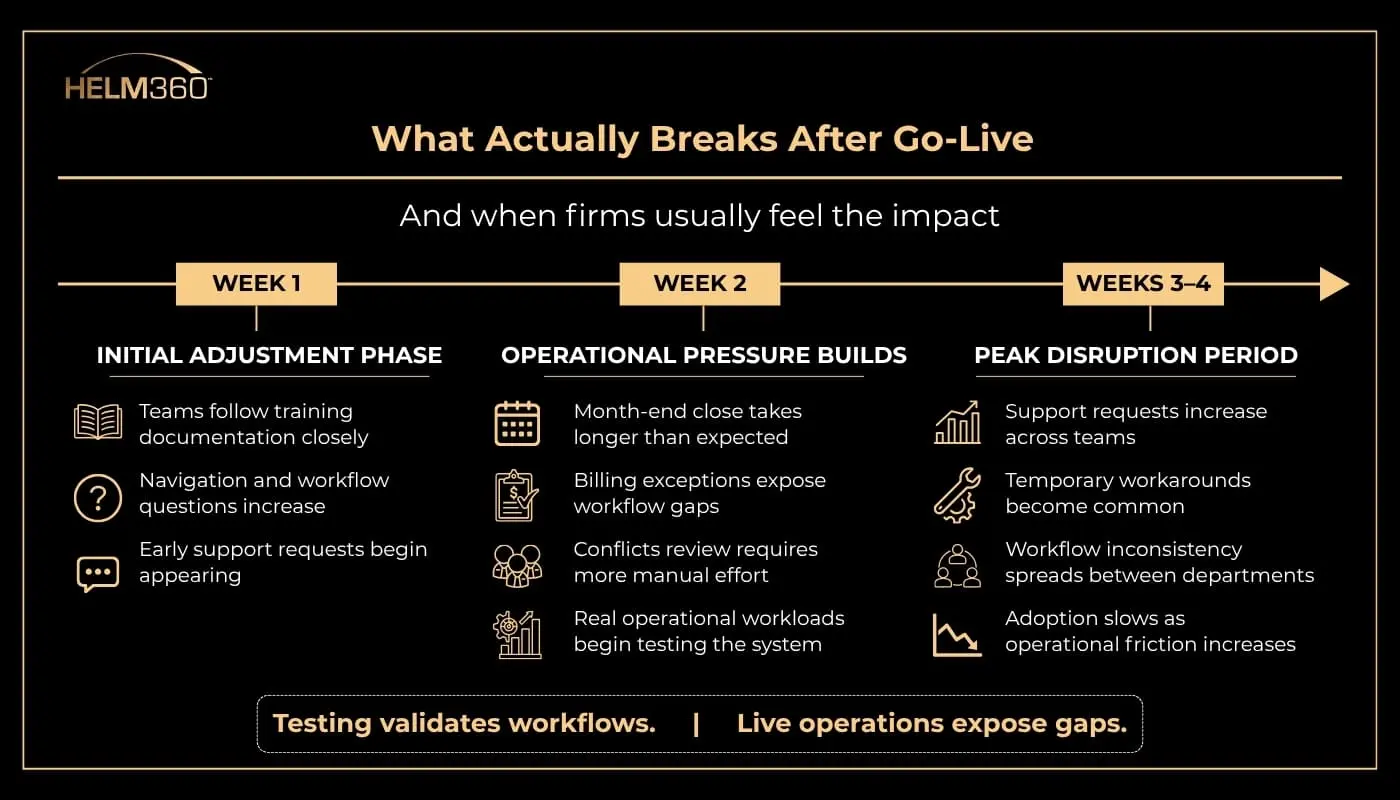
The gap between “it worked in testing” and “it works during a live month-end close with active users” is where operational disruption often becomes visible.
What looks stable during testing often changes once real users, live data, and operational pressure enter the environment.
Why Your Testing Missed This
Your UAT caught the obvious problems. What it couldn’t catch:
- The data nobody cleaned: Poor data quality only surfaces when your billing coordinator processes invoices with mismatched addresses or duplicate client records. Industry research shows data migration issues account for approximately 24% of implementation delays in legal tech projects. Fixing problems post-launch costs significantly more than cleaning data before implementation.
- The volume nobody simulated: Testing with a small group during daylight hours works fine. But what happens when all users across the firm enter time simultaneously during the end-of-week closing? According to a survey of 350 legal departments, 77% of in-house lawyers have experienced a failed technology implementation, citing poor technology as a reason for job attrition.
- The edge cases nobody documented: Complex billing scenarios, multiple currencies, time splitting across matters, and legacy rate arrangements predating your current system often create operational friction only after go-live because these workflows are rarely documented or fully captured during testing. Tech-driven legal change often struggles not from lack of ambition, but from gaps in planning, communication, and operational alignment.
- Nobody stressed the integration: Your DMS talks to Elite 3E fine during testing with sample data, until multiple users try to save precedents during a real deal closing. Then it fails. Every time.
The Hidden Costs Nobody Budgets For
Your implementation had a budget. Your post-go-live crisis doesn’t.
According to Gartner, only one in five legal matters sent to outside counsel stays within budget. The same pattern applies to software implementations. These costs hide in places your CFO won’t see until quarterly review:
Lost productivity:
- Your billing coordinator who used to process 40 invoices per day is down to 18
- Your finance team that closed the books in 5 days needs 12
- Partners delay client billing because “the system is being difficult”
Emergency vendor costs:
- That consulting firm you thought was done? They’re back at $350/hour
- Your vendor support contract just went from Silver to Platinum
- You’re paying for emergency training sessions every week
Revenue impact:
- Billing delays mean cash flow delays
- Client complaints about invoice errors
- Write-offs increase because tracking problems weren’t caught in time
The opportunity cost: Your IT team spent the last month firefighting instead of working on the client portal project that partners actually want.
Legal technology spend grew 48% last year. That growth means nothing if half of it goes to fixing preventable problems.
What Actually Works: The 60-Day Support Window
Firms that recover fast do three things differently:
1. They staff for reality, not hope
Instead of assuming “go-live is done,” they plan peak support for weeks 2-4:
- Dedicated help desk with escalation paths
- Vendor on retainer, not on emergency rates
- Key internal experts freed from other projects
- Daily standup meetings to track emerging issues
2. They track leading indicators, not vanity metrics
Forget “tickets closed.” Watch:
- Time to complete standard workflows (invoicing, time entry, month-end close)
- Workaround adoption rate
- Repeat ticket rate for the same issue
- Partner satisfaction score
When these start improving, you’re stabilizing. When they don’t, you need more support.
3. They treat disruption as discovery
Every issue that surfaces tells you something:
- That GL reconciliation taking 11 hours? Your chart of accounts mapping needs work
- Manual conflicts review? Your data cleanup wasn’t thorough enough
- Integration timeouts? Your performance testing used toy data
The firms that document system issues and corrective actions for future reference and conduct structured post-implementation reviews improve their next implementation significantly.
When You're Juggling Multiple Implementations
Here’s the scenario nobody plans for: your Elite 3E upgrade goes live in March. Your document management migration starts in April. Your new client portal launches in May.
Each disruption might be manageable alone. Together, they compound exponentially:
Your support team fragments:
- Jim handles Elite 3E escalations
- Sarah covers DMS issues
- Mike is buried in portal bugs
- Nobody has bandwidth for the integration between all three
Your users hit capacity:
- Training fatigue sets in after system #2
- Workarounds from system A conflict with workflows in system B
- People start avoiding new features entirely
Your budget evaporates:
- Three separate vendor support contracts running simultaneously
- Emergency consulting on multiple fronts
- Extended timelines because issues in one system cascade to others
The firms that handle this well sequence their implementations intentionally. Not to avoid overlap entirely, that’s unrealistic, but to ensure peak disruption periods don’t coincide. Elite 3E goes live in January. Let it stabilize through February. Start your next major change in March.
The rule: never have more than one major system in its first 2–3 weeks at the same time.
How Automated Testing Changes The Math
Manual testing takes weeks. Your firm probably doesn’t have weeks.
The traditional approach: your IT team clicks through 500 test scenarios manually. Takes 2-3 weeks. Misses anything that requires simultaneous users or peak load. Relies on whoever happens to know that obscure billing edge case.
According to Helm360’s guide on automated testing for law firms, automated testing compresses that timeline into hours. More importantly, it catches the problems manual testing misses:
- Load simulation: Test what happens when users enter time simultaneously at the end-of-week closing. Before go-live. Not after.
- Regression testing: Every upgrade breaks something. Automated tests run through your critical workflows, including billing, conflicts, time entry, financial reporting, and catch breaks before users do.
- Documentation that survives turnover: That senior developer who knows all your customizations? Automated tests document what she knows. When she leaves, the knowledge stays.
- Repeatable validation: Run the same 1,000 scenarios before every patch, every upgrade, every integration change. Same test coverage. Every time.
The firms using this approach cut their post-go-live support costs by 40-60%. Not because the implementations are perfect. Because they catch problems when fixing them is cheap.
The 90-Day Recovery Timeline (If You Do It Right)
Here’s what stabilization actually looks like:
Weeks 1-2: Triage
- Support tickets: 40-60 per day
- Focus: Keep core workflows running
- Success metric: Nobody threatening to quit
Weeks 3-4: Peak chaos
- Support tickets: 80-100 per day (this is normal)
- Focus: Distinguish between “fix now” and “fix next month”
- Success metric: Billing runs, even if it’s messy
Weeks 5-6: First improvements
- Support tickets: 50-70 per day
- Focus: Convert workarounds to proper workflows
- Success metric: Month-end close time decreasing
Weeks 7-12: Stabilization
- Support tickets: 20-30 per day
- Focus: Documentation and training gaps
- Success metric: Teams stop asking to go back to the old system
Firms that scale back support after week 2 don’t see these improvements until month 4-6. The difference? Significant extended consulting costs and immeasurable pain.
The Planning Checklist Nobody Uses (But Should)
Stop planning for go-live. Start planning for weeks 2-4:
Before implementation starts:
- Budget 30% extra for post-go-live support (not as contingency, as planned spend)
- Identify your top 10 edge cases and test them specifically
- Map every integration point and load test each one
- Document every custom workflow, especially the ones “everyone just knows”
Before go-live:
- Schedule daily standups for weeks 2-4 (not weekly — daily)
- Confirm vendor support availability during your peak times
- Create an escalation matrix with actual names and phone numbers
- Run a full dress rehearsal at production load (not sample data)
After go-live:
- Measure completion time for standard workflows daily
- Track repeat issues (if you’re fixing the same problem twice, you haven’t fixed it)
- Document every workaround and schedule proper fixes
- Survey users weekly, not after 90 days when it’s too late
The measurement that matters: How long does it take to complete your 10 most common workflows compared to the old system? If time entry takes 30% longer in week 4 than it did in the old system, you’re not stabilized yet.
What Mature Firms Do Differently
The firms that handle implementations well don’t avoid disruption. They compress it.
They automate regression testing so they catch breaks before users do. They load test at actual production volumes, not toy data. They staff support teams for weeks 2-4, like it’s part of the implementation budget, not an emergency response.
Most importantly, they treat every post-go-live issue as diagnostic data. That billing workflow taking too long? Your process needs redesign. Integration timing out? Your architecture has constraints. Users creating workarounds? Your training missed something.
The difference between a $500K implementation and a $1.2M nightmare is what happens in weeks 2-4. Plan for that window like your budget depends on it. Because it does.
Get The Support You Need For Go-live and Beyond
If your firm is planning an Elite 3E upgrade, practice management migration, or any major system change, the post-go-live period determines whether your investment pays off or becomes a cautionary tale.
Here’s what you might need:
For implementations:
- Quality assurance and user acceptance testing with documented, repeatable processes
- Performance testing at actual production load
- Quality assurance with documented, repeatable processes
For ongoing operations:
- Application managed services that handle system optimization and monitoring
- Upgrade testing that prevents disruption during routine updates
- Expert support during your critical windows
The conversation worth having: Not “how do we avoid disruption” but “how do we compress it from months into weeks and extract the lessons that prevent it next time.”
Talk to Helm360’s team about how your firm can approach implementations differently. We’ve guided firms through this exact transition, and we know what works when testing theory meets operational reality.