


How Healthy Are Your Law Firm Operations? A Practical Risk Checklist

A billing partner pulls up the monthly realization report on a Friday afternoon, and the number doesn’t match what finance sent over on Tuesday. Nobody makes a scene about it. People just quietly open their own spreadsheet, recalculate, and move on. It happens often enough that it barely registers anymore.
That small moment says more about a firm’s operational health than any technology budget does. Firms are pouring money into new systems and AI tools this year, technology spend across the industry grew nearly 10% in 2025 alone, and yet the quiet, everyday friction, the mismatched reports, the duplicate data entry, the conflicts check that depends on one paralegal remembering to run it, often gets left untouched. Investment and operational health are not the same thing, and the gap between them is where risk quietly builds.
In short: this checklist gives you a fast way to spot where that gap exists in your own firm, before a client, an auditor, or a partner finds it first.
- Six areas to check, from system integration to change management
- A one-week action list if you only have time to do three things
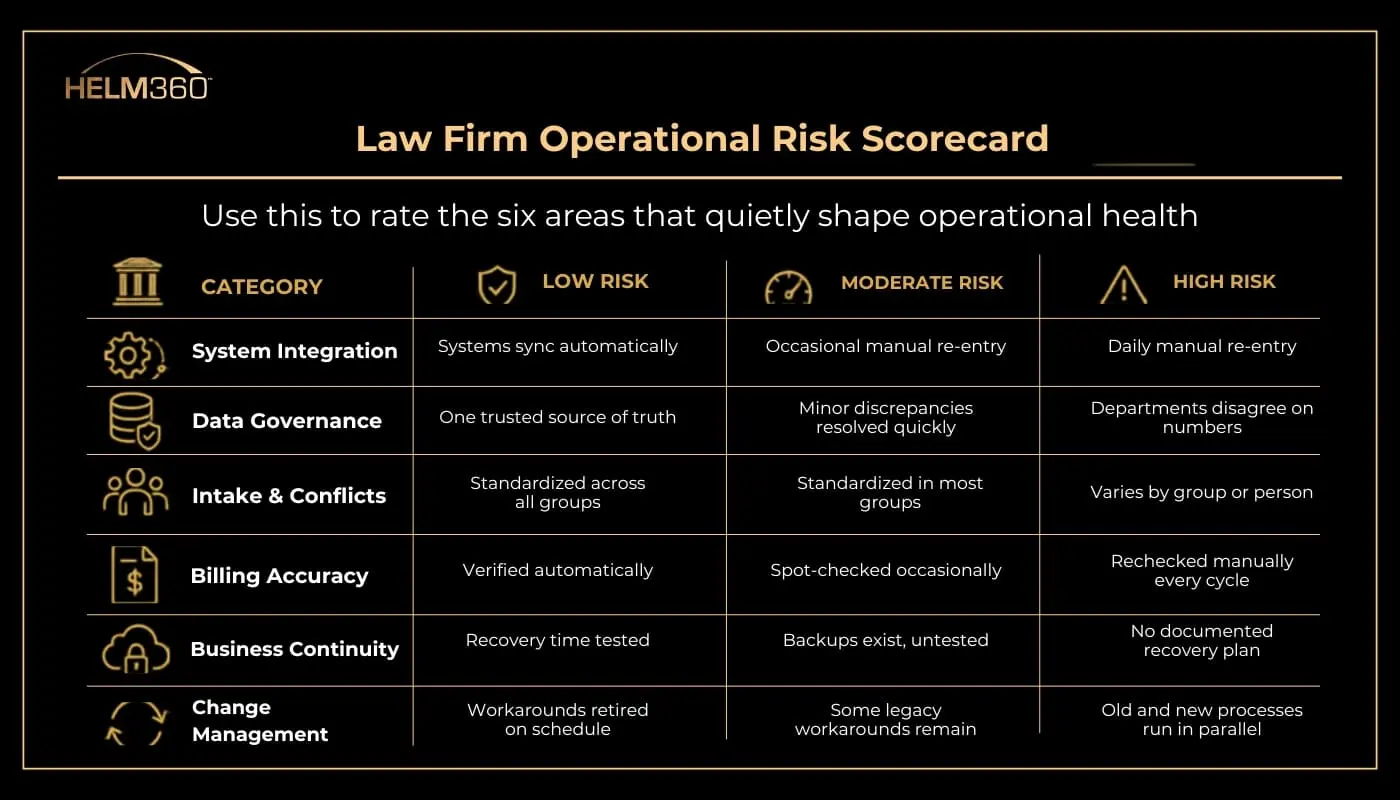
- A visual scorecard you can use to rate your own firm today
What Operational Risk Actually Looks Like Inside a Firm
Operational risk isn’t only a cybersecurity conversation, though that’s part of it. It’s the sum of everything a firm quietly depends on to function normally:
- System dependencies – how well platforms like Elite 3E, Aderant, ProLaw, and Intapp actually talk to each other, and what happens the day one of them goes down or gets upgraded
- Data integrity – whether billing, matter, and client data stays accurate and consistent across every system that touches it
- Workflow gaps – manual handoffs in intake, conflicts, or billing that quietly rely on one person remembering a step
- Vendor and infrastructure exposure – how much the firm leans on a single vendor, server, or unpatched system with no real fallback
None of this shows up on a balance sheet. It shows up in delayed invoices, a missed conflict flag, or a partner who no longer trusts the numbers in front of them.
What Operational Risk Actually Looks Like Inside a Firm
Two things are happening at once, and together they make operational discipline harder to postpone.
Firms are moving to new infrastructure faster than they’re updating the processes built around it. Helm360’s own research on where legal technology is heading in 2026 points to the ILTA 2025 Technology Survey, which polled 580 firms representing more than 152,000 attorneys and found that cloud adoption now happens by default with nearly every system upgrade. That pace leaves little room to ask whether an old workaround still makes sense on new infrastructure.
At the same time, professional services firms, law firms included, have become one of the most targeted sectors for cyberattacks, accounting for close to a fifth of all reported attacks in late 2025. Firms that haven’t mapped their own dependencies tend to be the slowest to recover, whether the disruption comes from an attack, a failed upgrade, or a simple human mistake.
The Law Firm Operational Health Checklist
Each item below follows the same short format: the question to ask, and the risk indicator that tells you it needs attention.
1. System Integration Health
Ask: Do practice management, billing, and document systems share data automatically, or does staff re-enter it by hand?
Watch for: Anyone manually copying data between two systems more than once a week.
Why it matters: Intapp handles intake, conflicts, and risk, while Elite 3E, Aderant, and ProLaw handle billing and matter management. When Helm360 connects the two properly,an approved matter can flow into billing without anyone re-typing it. When they are not connected well, that same matter gets entered twice, by two different people, in two different systems.
2. Data Quality and Governance
Ask: Is there one trusted source of truth for matter, client, and billing data?
Watch for: Two departments quoting different numbers for what should be the same figure.
Why it matters: A mismatch usually isn’t caught until someone downstream, a client, auditor, or managing partner asks a question the firm can’t answer cleanly.
3. Intake and Conflicts Workflow
Ask: Are conflicts checks and client onboarding handled the same way across every practice group?
Watch for: A process that depends on one person’s memory instead of a standard, repeatable checklist.
Why it matters: Firms that treat intake as a structured control point, rather than paperwork to get through, catch risk and compliance issues before they compound instead of finding them during a regulatory review months later.
4. Billing and Financial Reporting Accuracy
Ask: Can leadership trust a profitability report without manually re-checking it first?
Watch for: Reporting that still lives in a spreadsheet maintained by one person who knows the formulas.
Why it matters: Every hour spent re-verifying numbers is an hour not spent acting on them.
5. Business Continuity and Vendor Dependency
Ask: If your primary practice management vendor went down tomorrow, does anyone know the actual recovery time?
Watch for: Backups that have never actually been restored and timed, only confirmed to exist.
Why it matters: A recovery plan that’s never been tested is a guess, not a plan.
6. Change Management and Adoption
Ask: When a new tool goes live, is there a real plan to retire the old workaround?
Watch for: The old process still quietly running alongside the new system, months after go-live.
Why it matters: A system nobody monitors after launch slowly drifts back toward the habits it was meant to replace.
Three Quick Wins for This Week
If a full review isn’t realistic right now, start here:
- Ask one question in your next leadership meeting: which report number does everyone trust least, and why?
- Time one recovery test. Pick your most critical system and confirm how long a real restore actually takes.
- Name an owner for the checklist category that worries you most. A single accountable person turns a list into a habit.
Turning the Checklist Into a Habit
A checklist only earns its keep if someone actually revisits it. Firms that manage this well tend to treat it as a quarterly exercise, reviewed alongside system performance, data quality, and support ticket trends, rather than a one-time audit that gets filed away.
Operational risk rarely arrives as one dramatic failure. It builds slowly, through small inconsistencies that each look manageable on their own. A firm that checks in on its systems, data, and workflows on a regular rhythm is simply harder to catch off guard than one that waits for something to break first.
Where to Go From Here
Reviewing this internally is a solid first step, but an outside perspective often catches what’s hard to see from inside a firm’s own systems. Helm360’s consulting team works with firms every week on exactly these gaps, across Elite 3E, Aderant, ProLaw, and Intapp. If you’d like a second set of eyes on where your firm’s operational risk actually sits, get in touch.
Frequently Asked Questions
1. What is operational risk in a law firm?
It’s the exposure created by everyday systems, data, and workflows, not just cybersecurity. Manual handoffs, disconnected platforms, and unverified reporting all count.
2. How often should a firm review operational risk?
Quarterly works well for most firms. It’s frequent enough to catch small issues early without turning into a full-time compliance function.
3. Is operational risk the same as cybersecurity risk?
No. Cybersecurity is one piece of it. Operational risk also includes data governance, workflow gaps, and how dependent a firm is on any single system or vendor.
4. What’s usually the first sign of operational risk in a firm?
Reporting inconsistencies are often the earliest signal, different departments producing different numbers from what should be the same underlying data.
5. Can smaller or midsize firms use this checklist too?
Yes. The six categories apply regardless of firm size. Smaller firms often have fewer systems to check, which can make the review faster, not less necessary.
6. How often should law firms review their automated workflows?
Quarterly reviews are a reasonable baseline, with additional reviews triggered any time billing rules, matter types, or staffing change. Automation that isn’t revisited regularly tends to fall out of sync with how the firm actually works.